StackState Static Topology DSL
Overview
StackState Static Topology DSL allows you to easily define components, relations and health
in .topo files using a Topology Language.
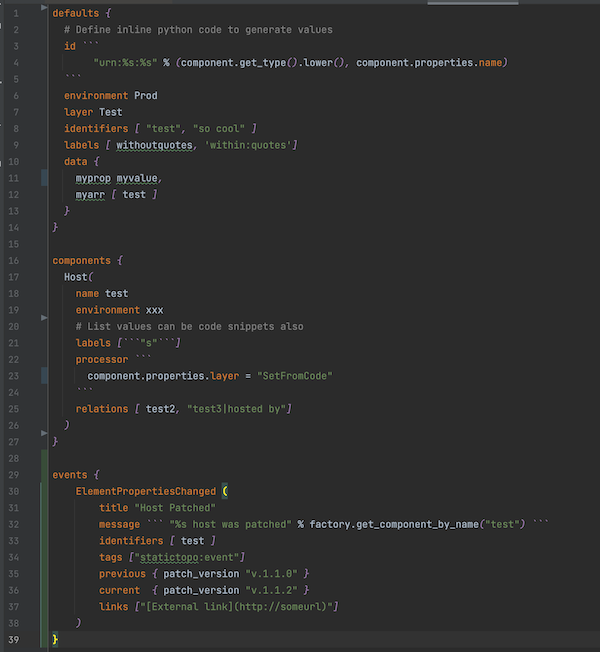
The topology can be sent to the StackState server via a CLI or configured as an Agent Check.
Syntax highlighting of .topo files can be done in VSCode, Intellij or any other text editor that supports TextMate Bundles.
Topology Language
The Topology language is a mix between component and event configuration and dynamic python snippets.
Structure of .topo file
defaults {
   ...
}

components {
   ...
}

events {
   ...
}
Components and Events are defined in their relevant sections.
Default Properties
| Name | Type | Description |
|---|---|---|
| id | string | Optional. |
| layer | string | Optional. |
| domain | string | Optional. |
| labels | list | Optional. |
| identifiers | list | Optional. |
| health | string | Optional. Defaults to CLEAR. Valid values are CRITICAL, DEVIATING, CLEAR |
| healthMessage | string | Optional |
| relations | list | Optional. id or name reference to related component. Use pipe symbol to define relation type. Use ‘<’ to reverse relation. |
| processor | code | Optional. Process component object using code to set other properties or querying factory object |
| eventProcessor | code | Optional. Process event object using code to set other properties or querying factory object |
| tags | list | Optional. Used for events. |
Component Properties
| Name | Type | Description |
|---|---|---|
| id | string | Optional. Defaults to urn:<type>:<name> when not defined |
| name | string | Required |
| layer | string | Optional. Defaults to unknown |
| domain | string | Optional.Defaults to unknown |
| labels | list | Optional. |
| identifiers | list | Optional. Defaults to id when no identifiers defined |
| health | string | Optional. Defaults to CLEAR. Valid values are CRITICAL, DEVIATING, CLEAR |
| healthMessage | string | Optional |
| relations | list | Optional. id or name reference to related component. Use pipe symbol to define relation type. Use ‘<’ to reverse relation. |
| processor | code | Optional. Process component object using code to set other properties or querying factory object |
| repeat | int | Optional. Repeat current component for the specified amount. Use code snippet to generate name. |
These properties can also be defined in the defaults section for all components.
Event Properties
| Name | Type | Description |
|---|---|---|
| title | string | Optional. Defaults to unknown |
| message | string | Optional.Defaults to `` |
| identifiers | list | Required. At least 1 identifier should be defined |
| tags | list | Optional. |
| links | list | Optional. Links in the form [description](url) |
| processor | code | Optional. Process event object using code to set other properties or querying factory object |
The properties can also be defined in the defaults section for all events.
Property types
stringcan be defined with optional single or double quotes.floatintbooleanmapdefined as{ property: value, property: value}wherevaluecan be any property typelistdefined as[value, value]wherevaluecan be any property typecodeis a snippet of python code. Defined as 3 backticks for opening and closing.
Code snippets
Denoted by ``` python code ```
Code snippets can be used for any component property to generate the value.
The python code is interpreted with asteval.
The code will have access to a factory object. This can be used to query for other components or create components
programmatically. The component object represents the current component being created.
The event object represents the current event being created.
See API Documentation
Processor Code Property
Define a processor property on the component or in the defaults as a code snippet.
Easier to programmatically manipulate the component for complex processing.
Comments
Comments are support in the form of #
Defaults Section
Any list type (labels, relations, identifiers) or map type (data) properties are merged with the component in the components section. For all other properties, if they are defined on the component, the default is ignored.
Components Section
A component is defined by first entering the component type followed by opening brackets (.
Define the properties and close with a closing bracket )
Events Section
An event is defined by first entering the event type followed by opening brackets (.
Define the properties and close with a closing bracket )
Supported Event Types
- ElementPropertyChanged
| Name | Type | Description |
|---|---|---|
| previous | map | Optional. Previous change |
| current | map | Optional. Current change |
events {
    ElementPropertiesChanged (
        title "Host Patched"
        message ``` "%s host was patched" % factory.get_component_by_name("test") ```
        identifiers [ test ]
        tags ["statictopo:event"]
        previous { patch_version "v.1.1.0" }
        current  { patch_version "v.1.1.2" }
        links ["[External link](http://someurl)"]
    )
}
Sample Topology
defaults {
    id ```
       "urn:%s:%s" % (component.get_type().lower(), component.properties.name)
    ```
    environment Prod
    layer Machines
    domain StaticTopology
    identifiers [ ```component.uid``` ]
    labels [ staticdemo ]
    data {
        myprop myvalue,
        myarr [ test ]
    }
}

components {
    host (
        name test
        labels ["static:test"]
        relations [ test2, "test3|hosted by"]
    )
    host(name test2, health CRITICAL)
    host(name test3)
    host(name ``` "test_%s" % repeat_index ```, repeat 5)
}

events {
    ElementPropertiesChanged (
        title "Host Patched"
        message ``` "%s host was patched" % factory.get_component_by_name("test") ```
        identifiers [ test ]
        tags ["statictopo:event"]
        previous { patch_version "v.1.1.0" }
        current  { patch_version "v.1.1.2" }
        links ["[External link](http://someurl)"]
    )
}
Installation
This package can be used as a standalone cli or as an agent check.
Requirements
- Python v.3.7+. See Python installation guide
- virtualenv. See Pipenv & Virtual Environments guide
- Custom Synchronization StackPack
Custom Synchronization StackPack
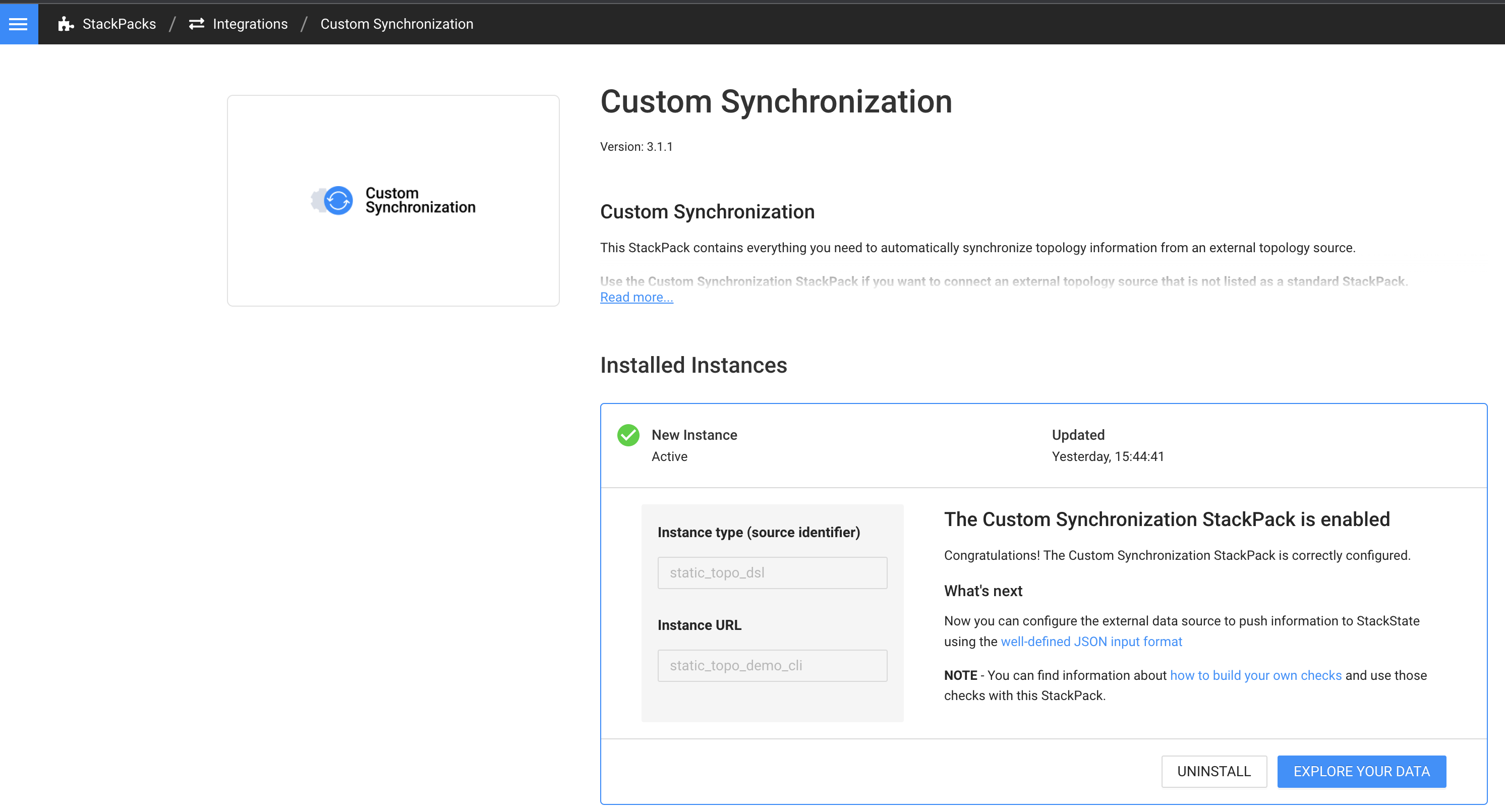
On the StackState server create an instance of the StackPack similar to:
Create a virtual environment
On your local machine setup a virtual environment
$ # Install virtual env
$ pip install virtualenv
$ virtualenv --version
$ # Create a virtual environment in a directory of your choosing
$ cd project_folder
$ virtualenv venv
$ source venv/bin/activate
$ pip install six requests
Install ststopo CLI
python -m pip install https://github.com/stackstate-lab/static-topology-dsl-integration/releases/download/0.2.1/sts_static_topology-0.2.1-py2.py3-none-any.whl
The ststopo command-line utility reads .topo files specified in the conf.yaml and sends the resulting Components, Relations and Health to StackState.
$ ststopo --help
Usage: ststopo [OPTIONS]

Options:
  -f, --conf  TEXT  Configuration yaml file
  --log-level TEXT  Log Level
  --dry-run         Dry run static topology creation
  --work-dir  TEXT  Set the current working directory
  --help            Show this message and exit.
Create a conf.yaml similar to the one below. Remember to change the receiver_url and api_key
stackstate:
  receiver_url: https://<your stackstate server>/receiver
  api_key: xxxxx
  #  use as the source identifier and url in StackState integrations when creating a Custom Synchronzation instance.
  instance_type: static_topo_dsl
  instance_url: static_topo_demo_cli
  health_sync:
    source_name: static_health
    stream_id: "static_health_topo"   # unique id representing this stream instance
    expiry_interval_seconds: 2592000  # 30 Days
    repeat_interval_seconds: 1800     # 30 Minutes
  internal_hostname: localhost

topo_files:
  - ./share/topologies    # can be a directory
Create a sample topology and dry run to see resulting Components, Relations and Health
You can copy sample.topo to ./share/topologies
$ mkdir -p ./share/topologies
$ curl -L https://raw.githubusercontent.com/stackstate-lab/static-topology-dsl-integration/master/tests/resources/share/topologies/sample.topo -o ./share/topologies/sample.topo
$ ststopo --dry-run
Click to see output
Loading configuration from ./conf.yaml
Running Static Topology sync in dry-run mode
2022.05.06 10:16:51 - root (27) - INFO: Processing './share/topologies/sample.topo'
Discovered Component and Relation information:
--------------------------------------------------------------------------------
{
    "apiKey": "xxxx",
    "collection_timestamp": 1651832211.193224,
    "internalHostname": "localhost",
    "events": {},
    "metrics": [],
    "service_checks": [],
    "health": [],
    "topologies": [
        {
            "start_snapshot": true,
            "stop_snapshot": true,
            "instance": {
                "type": "static_topo_dsl",
                "url": "static_topo_demo_cli"
            },
            "delete_ids": [],
            "components": [
                {
                    "externalId": "urn:host:test10",
                    "type": {
                        "name": "host"
                    },
                    "data": {
                        "name": "test10",
                        "layer": "Machines",
                        "domain": "StaticTopology",
                        "environment": "Prod",
                        "labels": [
                            "static:test",
                            "staticdemo"
                        ],
                        "identifiers": [
                            "urn:host:test10"
                        ],
                        "custom_properties": {
                            "myprop": "myvalue",
                            "myarr": [
                                "test"
                            ]
                        }
                    }
                },
                {
                    "externalId": "urn:host:test12",
                    "type": {
                        "name": "host"
                    },
                    "data": {
                        "name": "test12",
                        "layer": "Machines",
                        "domain": "StaticTopology",
                        "environment": "Prod",
                        "labels": [
                            "staticdemo"
                        ],
                        "identifiers": [
                            "urn:host:test12"
                        ],
                        "custom_properties": {
                            "myprop": "myvalue",
                            "myarr": [
                                "test"
                            ]
                        }
                    }
                }
            ],
            "relations": [
                {
                    "externalId": "urn:host:test10 --> urn:host:test12",
                    "type": {
                        "name": "uses"
                    },
                    "sourceId": "urn:host:test10",
                    "targetId": "urn:host:test12",
                    "data": {
                        "labels": []
                    }
                }
            ]
        }
    ]
}
--------------------------------------------------------------------------------
{
    "apiKey": "xxxxx",
    "collection_timestamp": 1651832211.194588,
    "internalHostname": "localhost",
    "events": {},
    "metrics": [],
    "service_checks": [],
    "health": [
        {
            "start_snapshot": {
                "repeat_interval_s": 1800
            },
            "stop_snapshot": {},
            "stream": {
                "urn": "urn:health:static_health:static_health_topo",
            },
            "check_states": [
                {
                    "checkStateId": "test10_static_states",
                    "name": "HealthCheck",
                    "topologyElementIdentifier": "urn:host:test10",
                    "message": "",
                    "health": "CLEAR"
                },
                {
                    "checkStateId": "test12_static_states",
                    "name": "HealthCheck",
                    "topologyElementIdentifier": "urn:host:test12",
                    "message": "",
                    "health": "CLEAR"
                }
            ]
        }
    ],
    "topologies": []
}
--------------------------------------------------------------------------------
--------------------------------------------------------------------------------
Total Components = 2.
Total Relations = 1.
Total Health Syncs = 2.
--------------------------------------------------------------------------------
Done
To send to StackState run ststopo
Agent Check
Download Static Topology DSL agent check release to the machine running the StackState Agent.
$ curl -o sts_static_topology-0.2.1.zip -L https://github.com/stackstate-lab/static-topology-dsl-integration/releases/download/0.2.1/sts_static_topology-0.2.1.zip
$ unzip ./sts_static_topology-0.2.1.zip
$ ./install.sh
$ cd /etc/stackstate-agent/conf.d/static_topology_dsl.d
$ cp ./conf.yaml.example ./conf.yaml
$ chown stackstate-agent:stackstate-agent ./conf.yaml
$ vi ./conf.yaml
Change the configuration to point to the location of your .topo files
init_config:

instances:
  - instance_url: "static_topo_demo"
    min_collection_interval: 300
    topo_files:
      - /etc/stackstate-agent/share/topologies/
On the StackState server create an instance of the Custom Synchronization StackPack for the instance_url
Syntax Highlighting
For VSCode, copy ./grammar/topo-vscode to ~/.vscode/extensions
For Intellij import the ./grammar/topo-tmbundle. See Textmate Bundles
Development
Topology grammar
The Topology language is defined in topology.tx using Textx meta-language
Visualization of the model topoloy.topo

Reference Documentation
See reference